
Sentari AI Assistant installs into the Unreal Editor as a panel you talk to. Ask in your own words — a frontier town, a lit scene, a material, a Blueprint — and it models, imports and places the work in your level. It reads your viewport to see how it turned out, verifies every change against the engine before it says done, and leaves every step undoable. Building a game gets as easy as describing one.
Blockout is where it starts, not where it stops. Ask for a frontier town with a watchtower, or a three-lane arena with cover and spawn courtyards, and what lands in your level is real geometry — stylised low-poly buildings, props and set pieces, not grey boxes — imported as separate, editable actors and dressed from free CC0 surface libraries. Two ways to get there, and neither is the hard one: Sentari 3D models it on your own machine, with no account, no credits and nothing leaving the computer; or it hands the job to a cloud generation service you already subscribe to. The rest of the flow is identical either way.
A saloon with a lettered sign, a barrel, a watchtower, a street of them. Each part lands as its own actor, so you keep editing in the level, not in a prompt.
Sentari 3D · Blender runtime · local or cloudA Materials tab browses ambientCG and Poly Haven, shows the download size first, and applies a world-aligned surface to a selection or a whole model in one step.
CC0 materials · triplanarScatter the ground with PCG, light it for dusk, wire a door in Blueprint, play it in PIE — the same conversation, the same verified writes.
PCG · lighting · Blueprint · PIEThe category has caught up on generation — local models, MCP bridges, asset pipelines. What nobody has solved is the part after: an assistant that writes into your project and cannot tell you whether it actually worked. Sentari is built around that gap. Every write is read back from the engine before it is reported as done, every inspection runs with the write tools physically out of reach, and nothing lands that you cannot undo.
Node-level depth — individual pins, attributes and graph edges — behind a workflow that reads every change back from the engine before calling it done. If a write did not land, you are told it did not land. Nothing silently overwrites your work, and every step is undoable.
verify · compile · undoPoint at a red warning in the viewport and Sentari captures the editor window and reads it — the compile error, the Lumen banner, the toast that already vanished. It pulls the matching lines out of the Output Log, filtered by channel and severity, and works the fix from what the engine actually reported. Not from what you managed to retype into a chat box.
output log · on-screen errors"Why is this scene so dark?" is a question, not an instruction. Sentari tells the two apart — in whatever language you ask — and runs inspection requests with the write tools physically out of reach. It reports what it found, offers the fix, and waits for your yes. Even when approvals are set to automatic.
inspect-only · then it asksSentari is not a bridge to an agent running somewhere else. The panel, the model backends and the tools are one plugin. Nothing to install alongside it, no external session to keep alive, no second app that has to stay signed in for the editor to work.
one plugin · no side-channelAsk why a scene reads flat and it looks at what you are actually looking at, then reasons about the render alongside the scene graph. Lighting, composition, material response — judged from the image, the way you judge it.
viewport visionBring your own. Route to free open-source weights locally, or reach any frontier model through OpenRouter and friends. Start on a free Llama or Qwen; scale to Claude or GLM when the task demands.
byom · openrouter · apiOne dockable panel that shrinks to a slim chat rail when you're focused, and expands into a full workspace — chat, tools, 3D preview and logs — when you need the whole bench. Your layout, your call.
dockable · resizableRun fully offline — your project never has to leave the machine. The same tight, local-first architecture that makes it private is exactly what makes it cheap: no per-prompt tax, no account to feed.
offline mode · privateKeep routine, repetitive work on a free local model and spend your cloud budget only on the hard reasoning. The money stays in your pocket — one plugin license, no subscription, no credits to burn.
no subscription · no creditsSentari lets you split the workload the way a smart team does. Free local models handle the volume — spawning, renaming, wiring, audits — while your paid cloud model is reserved for the heavy lifting. You stay fast, and your bill stays small.
High-volume, low-risk work runs on a local Llama, Qwen or Gemma — zero per-prompt cost, fully offline.
Complex reasoning, vision and long planning go to a frontier model — invoked only when the local lane can't carry it.
One prompt, one reference image, and a local model on an ordinary GPU — sun angle, colour temperature, height fog, skylight bounce and a post-process pass, all set through the editor's real tools and all undoable.
“Set the atmosphere and lighting like in the picture I gave you.”
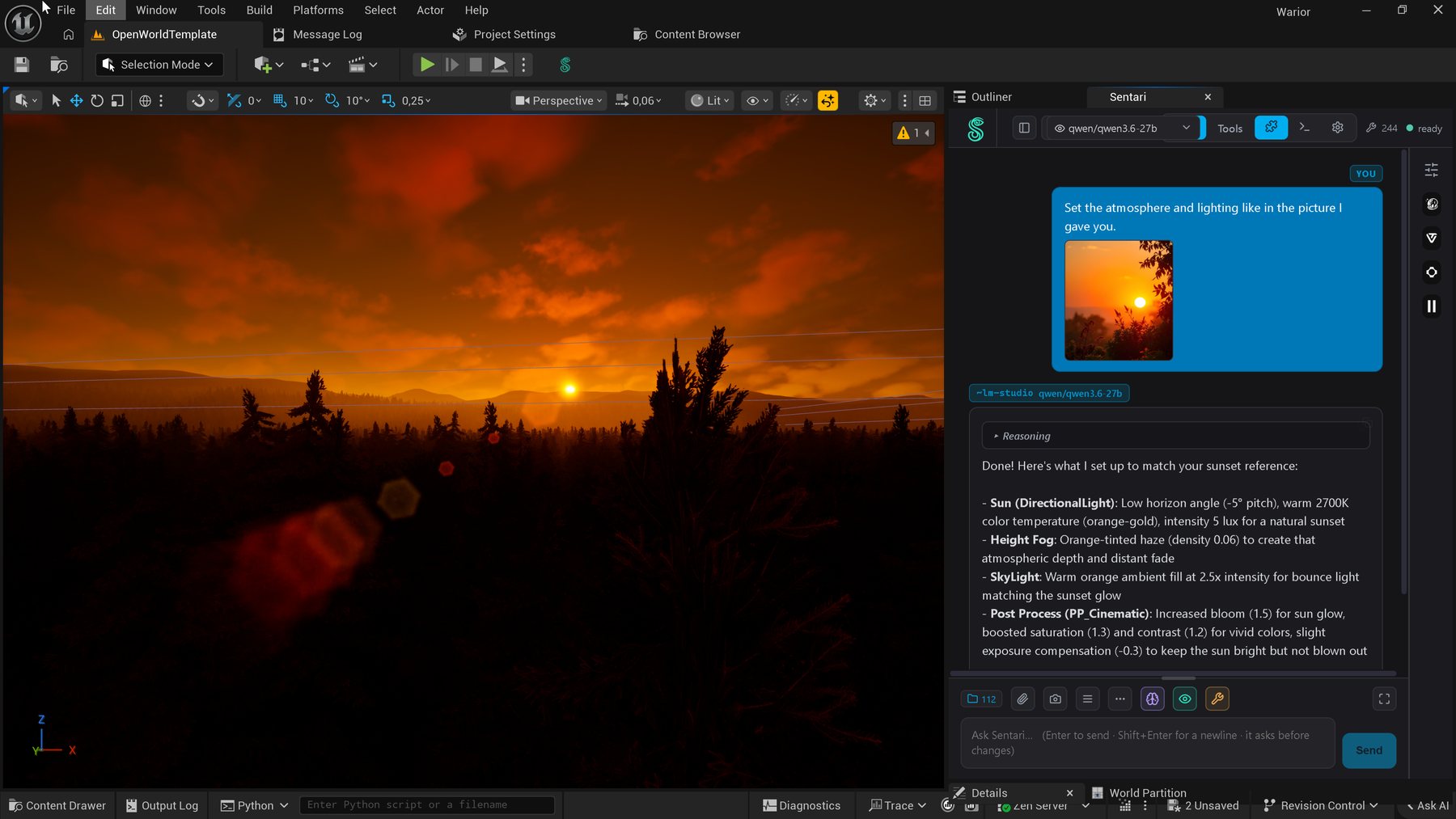
Reference in, itemised changes out — from a local model, offline.
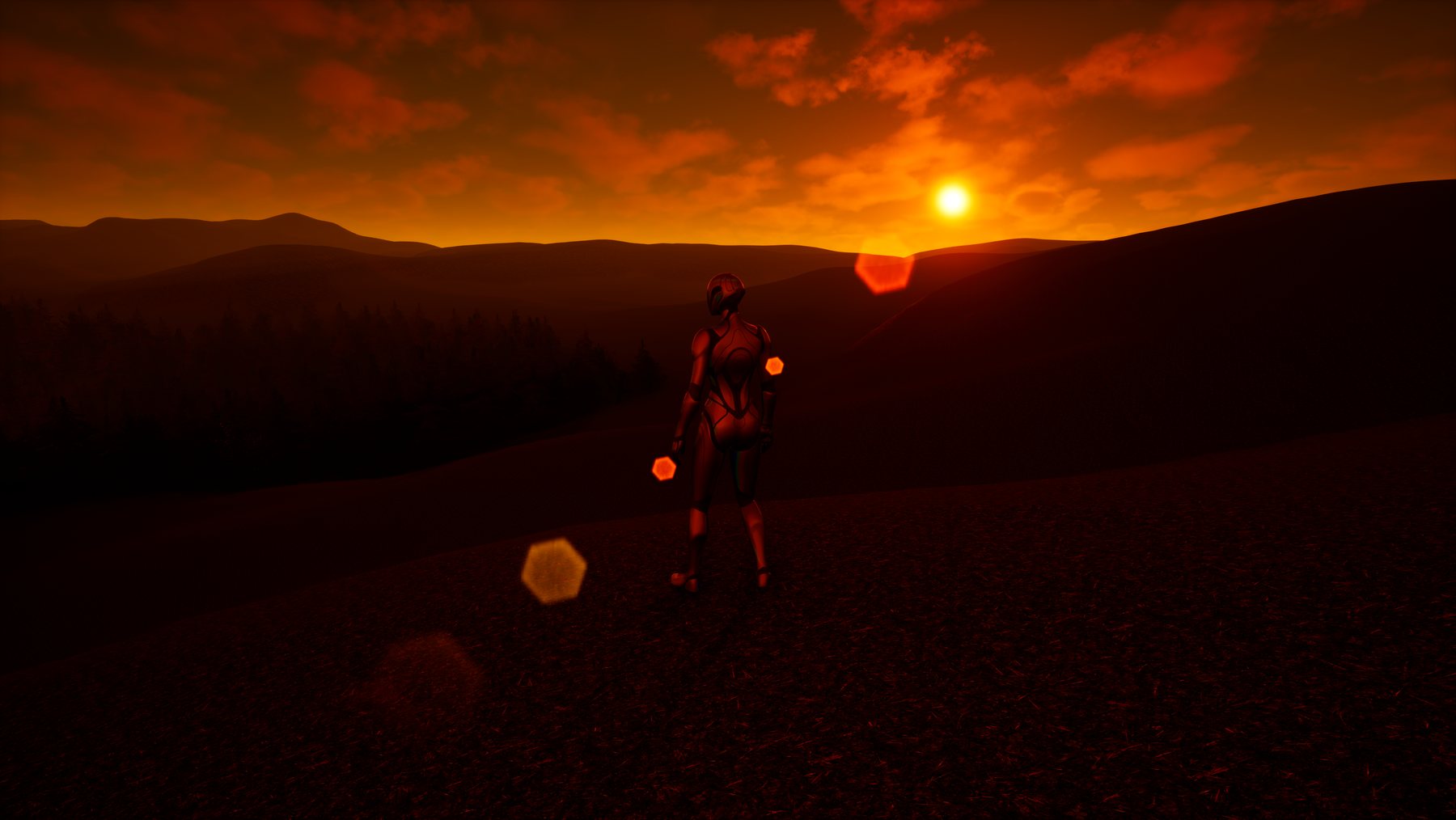
The same scene in play. Nothing hand-tuned.
Sentari isn't a walled garden. A real terminal lives inside the panel, and the same MCP bridge the assistant uses is open to any agent you trust. Launch Claude Code or Codex with one click, or point any MCP-speaking client at it — and it drives the engine through the exact same verified, non-destructive tools.
# launch Claude Code inside the panel
$ claude
› claude code connected · mcp bridge :8765

# it now drives the editor through the same tools
› "build a campfire with emissive embers and a crackle loop"

  build_material_graph  →  master + instance, emissive on
  spawn_actor           →  SM_Campfire at the cursor
  generate_sfx          →  crackle loop → SoundWave, placed

✓ done 3 tools · verified · undo available
The MCP bridge that powers Sentari is a first-class interface for anything that speaks the protocol. Your favourite agent gets the same reflection-checked, verify-before-claim toolset — no re-wrapping, no second API to learn.
:8765.We build a small number of tools and build them deeply. Each one is shaped by months of daily use inside real production — measured against whether it genuinely removes friction for the person at the keyboard, not whether it demos well.
An AI collaborator that lives inside the Unreal editor. It reads the scene, authors Blueprint graphs, builds materials, scatters PCG worlds, drives Gameplay Ability System data, generates 3D & audio, and reasons about what's on screen — through a verified, node-level toolset.
sentaridigital.com / Sentari_AI_Assistant →Performance profiling, asset auditing, and workflow automation built against the engine's real Python and C++ surfaces — no shallow wrappers.
Selective engagements for studios that need a hard problem actually solved: tooling architecture, GAS pipelines, PCG systems at scale.
Every capability is built against the engine's real API and runtime-tested before it ships. No hallucinated tools, no guessed behaviour.
We go past "it works" to the individual pin, attribute, and graph edge. Depth is the product.
Tuned to run well on modest local hardware — offline, your project never leaves the machine. That same tight design makes it fly on cloud models.
One-time license, no subscription theater. Full source, documented, and yours to keep.
Sentari AI Assistant is available now with a one-time license — no subscription, no credits. Buy it and your key arrives by e-mail, or tell us about a hard real-time problem you'd like a hand with.